

ELLIPAL Titan 2.0 Review
Best for: Air-gap signing with a large screen
Score Breakdown
Quick Specs
Pros & Cons
Pros
- 100% air-gapped signing: no Bluetooth, no Wi-Fi, no NFC, no USB data
- 4-inch IPS touchscreen is large enough to read the full address and amount before signing
- Camera on the back makes QR signing feel like using a phone
- CC EAL5+ secure element
- Sealed metal body with anti-tamper wipe on forced entry or too many wrong passwords
- BIP39 standard seed. New wallets create 24 words. Restore accepts 12/15/18/21/24 words
- BIP39 passphrase and hidden wallet supported
- 45+ chains and 10,000+ tokens in the current app
- NFTs on Ethereum and Polygon
- WalletConnect and MetaMask pairing for DeFi
- Firmware updates stay fully offline via the Security Adapter and microSD card
Cons
- Device plus charging stand is bulky -- desk wallet, not a pocket card
- You need the ELLIPAL app on a phone. No desktop-first workflow like Trezor Suite or Sparrow
- Firmware is only partly open. Cannot verify the secure element the way you can with some Trezor or Keystone builds
- Fat DeFi QR codes can fail and need a retry if lighting or camera angle is off
- Do not import the Titan seed into the phone app -- that destroys the air gap
- Fake sites exist. Only use ellipal.com
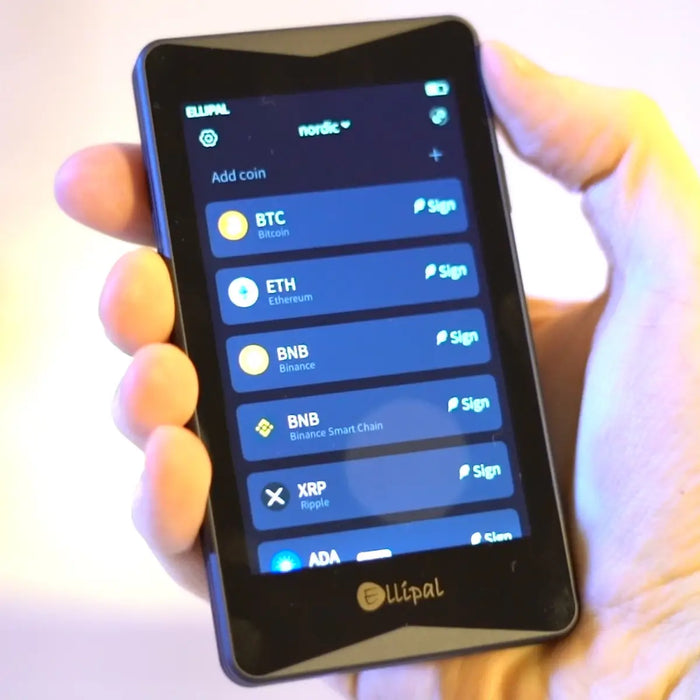
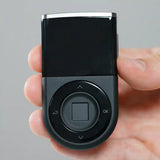
The ELLIPAL Titan 2.0 is a phone-sized air-gapped hardware wallet. It has no Wi-Fi, no Bluetooth, no NFC, and no USB data port. You build transactions in the ELLIPAL app on your phone, then sign them by scanning QR codes with the camera on the back of the device.
The private keys are generated inside the Titan and never leave the device. The phone prepares the transaction and connects to the network. Scanning and approving on the device screen is what actually authorises a send.
ELLIPAL is based in Hong Kong. The company started in 2018. The first Titan launched in 2019. Titan 2.0 arrived in 2023 with a CC EAL5+ secure element and the same sealed metal body. This page covers specs, setup, QR signing, the charging stand, coin support, the app, and the limits that still matter.
Physical Design
The Titan 2.0 looks like a small phone on purpose. That is why setup feels easy if you have used a smartphone wallet. The 4-inch IPS touchscreen is sharp, quick, and large enough to read an address and amount before you sign. This is a flat metal slab, 118 x 66 x 9.7 mm -- not rounded, not a card.
The body is fully sealed. Forced opening is designed to destroy the unit. The metal case and a tamper-detection wipe that triggers on forced entry or enough failed passwords are the physical answer to extraction attacks. IP65 rating on several spec sheets means dust and low-pressure water spray are covered.
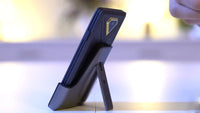
Battery is 1,400 mAh. Charging goes through pogo pins on the bottom into the Security Adapter stand, not through a USB port on the body. There is no USB data port. That is the point. The key generation and signing happen inside a CC EAL5+ secure element on the board.
What Is in the Box

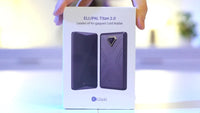
Typical kit: Titan 2.0, Security Adapter charging stand, USB charging cable, microSD card for firmware updates, two seed phrase cards, quick start papers, and a screen protector.

Charge the device on the stand before first setup. Keep the stand. Without it you cannot charge the battery or run the official firmware update path.
Camera and QR Signing

The camera is the whole product. Every transaction flows through it:
- Build the send in the ELLIPAL app.
- The app shows an unsigned QR.
- Tap Sign on the Titan 2.0 and scan that QR with the device camera.
- Read address, amount, and fee on the 4-inch screen.
- Enter the device password and approve.
- The Titan shows a signed QR.
- The phone scans it and broadcasts the transaction.
If the screen and the app disagree on the address or amount, stop. Do not approve.

MetaMask and WalletConnect are available from the app for DeFi access. Signing still happens on the Titan -- the air gap is not broken.
Setup
Before anything else, check that the box seal is intact and the device shows a first-boot screen prompting you to create a new wallet. If it asks to restore an existing wallet immediately, do not proceed with that unit.
Do this at home. No livestream. No photo of the seed.
- Charge and power on. Sit the Titan on the Security Adapter. Let it charge. Power it on from the touchscreen.
- Create the wallet on the device. Tap Create account. Set the device password -- this unlocks the hardware, it is not the seed. Let the device generate a 24-word seed. Do not import a seed you made on a website. Write the 24 words on the cards from the box. Confirm them on-screen. Optional: set a passphrase for a hidden wallet on top of the same seed.
- Connect the app. Install the official ELLIPAL app on iOS or Android. Scan the Titan QR from the app. The app is the portfolio view. The device is the vault.
- Update firmware before large deposits. Check Settings > About. Download the official update zip from ELLIPAL only -- never from a search result. Put it on a FAT32 microSD card. Insert the card in the Security Adapter and follow the on-screen instructions. The update takes about 5 minutes. Stay with it until it reboots.
App and Coins
The ELLIPAL app is where balances, history, buy, swap, and most extra tools live. Supported networks include Bitcoin, Ethereum, BNB Smart Chain, Solana, XRP, Tron, Cardano, Polkadot, Avalanche, Polygon, Base, Sui, Stellar, and more. Token standards: ERC-20, BEP-20, TRC-20. Official claim is 45+ blockchains and 10,000+ tokens.
Inside the app: send and receive, token management per chain, swap through third-party partners, buy and sell on-ramps, a small staking section, NFT view on Ethereum and Polygon, WalletConnect for dApps, and a prediction market section. ELLIPAL does not add its own fee on partner rails -- the partners still charge, so read the quote before tapping.
To add a token not on the default list, open the network and add it under assets. ELLIPAL says missing tokens can be requested by email. New chain support lands in the app without touching the device. Device-side changes still go through firmware updates via microSD.
Security Record
Security record: 2 out of 3 -- air-gap design is strong, no public Titan 2.0 chip-extract event, firmware is not fully auditable.
2018-2019: ELLIPAL launches. The early EC01 plastic model had USB-related issues flagged by researchers, including Ledger Donjon work. ELLIPAL's response was the sealed Titan: no USB data, metal body, anti-tamper wipe.
2023: Titan 2.0 adds a CC EAL5+ secure element to the existing design.
October 2025: A US user reported a large XRP loss initially described as a cold-wallet hack. Later write-ups indicate the seed had been imported into the mobile app, so the keys were no longer air-gapped. That is a user backup mistake, not a published extract from the Titan chip.
2026: No known mass key-extraction report on Titan 2.0 at the time of writing. Phishing pages and fake seed-checker sites exist. The official domain is ellipal.com. Never paste your 24 words into a website.
Verdict
The ELLIPAL Titan 2.0 scores 88 because the air gap, 4-inch screen, and app coverage make it easy to use as real cold storage. Bulk, closed firmware, and phone-app dependence are the reasons it is not higher.
Buy it if you want QR-only signing, a screen you can actually read, and a metal unit that stays fully offline. Skip it if you want a thin daily-carry card, fully open firmware, or a desktop wallet like Sparrow as the main interface.
Write the 24 words on paper. Charge it on the stand. Confirm every send on the Titan screen. That is the whole method.
FAQ
Is the ELLIPAL Titan 2.0 air-gapped?
Yes. No Wi-Fi, Bluetooth, NFC, or USB data port. QR codes are the only data path.
Does the ELLIPAL Titan 2.0 work with iPhone and Android?
Yes. The official ELLIPAL app runs on both iOS and Android. The camera-based QR workflow does not require Bluetooth or NFC.
How do I charge the ELLIPAL Titan 2.0?
Place it on the Security Adapter stand and plug the stand into USB power. There is no charging or data port on the wallet body itself.
How many coins does the ELLIPAL Titan 2.0 support?
Official claim is 45+ blockchains and 10,000+ tokens in the app. You can add extra tokens per network and request missing ones by email.
Can I use WalletConnect and MetaMask?
Yes, from the ELLIPAL app. The Titan still signs every transaction -- no keys leave the device.
What seed phrase does it use?
New wallets create 24 words. Restore supports 12, 15, 18, 21, or 24 words. A BIP39 passphrase for a hidden wallet is optional.
Ready to buy the ELLIPAL Titan 2.0?
Starting at $169. Check current price before you buy.
Buy ELLIPAL Titan 2.0 →Affiliate link · No extra cost to you
This page contains affiliate links. If you buy through them, I may earn a small commission at no extra cost to you. I only review products I have personally tested.