

SafePal S1 Pro Review
Best for: Air-gapped QR signing with wide SafePal app features
$89.99
Score Breakdown
Quick Specs
Pros & Cons
Pros
- Air-gapped signing. No Bluetooth, Wi-Fi, or NFC
- CC EAL6+ secure element on current units
- Anti-tamper self-destruct if the case is opened
- PIN and optional BIP39 passphrase / hidden wallet
- SafePal app: 200+ networks, manual tokens, DeFi, WalletConnect, earn, farm, stake
- In-app swap and cross-chain bridge
- Binance mini program with no extra SafePal trading fee
- 0.2% swap fee for other SafePal routes
- Metal and glass build is a step up from the plastic S1
- Center camera is easier to line up than the older S1
Cons
- At $89.99 it is $40 more than the plastic S1 for the same air-gap idea
- 1.3-inch D-pad screen -- small compared to QR wallets with 4-inch displays
- Third-party wallet support is thinner than Trezor or Keystone
- Firmware not reproducible like Trezor. Open source on the store page overstates it
- USB is used for firmware updates, not signing -- but not microSD-only like Keystone
- 2021 Kraken research on the original S1 family. SafePal issued firmware
- New chain support sometimes requires a device firmware update, not just an app toggle
What Is the SafePal S1 Pro?
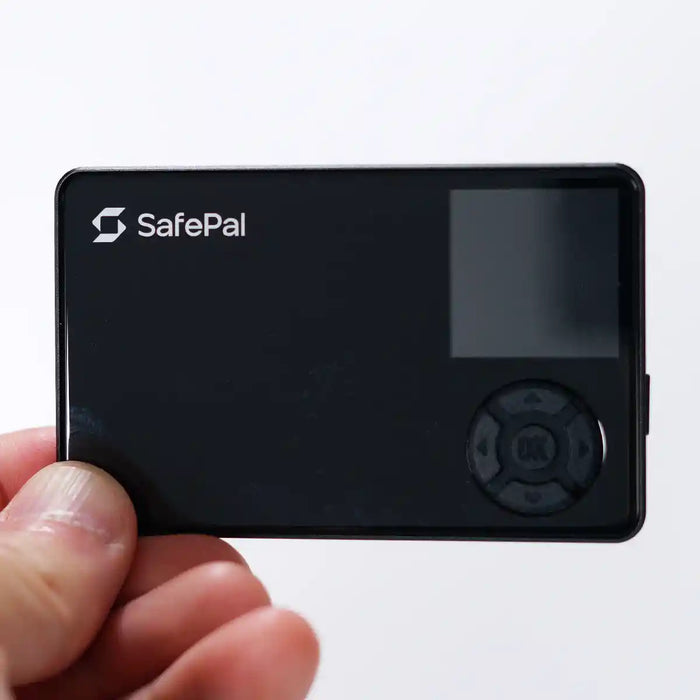
The SafePal S1 Pro is the air-gapped, metal-body model in the SafePal lineup. No Bluetooth, no Wi-Fi, no NFC. Signing happens through QR codes. The private keys stay on the device. The SafePal phone app manages the portfolio, builds unsigned transactions as a QR code, and broadcasts the signed result. The S1 Pro camera reads the unsigned QR, the CC EAL6+ chip signs it, and the device displays the signed QR back to the app.
SafePal markets this model as open source. The accurate description is partial: parts of the app code are public, but the device firmware and secure-element code are not independently reproducible the way Trezor's are.
The S1 Pro sits between the plastic S1 (same air-gap, $40 less) and the X1 (Bluetooth signing, clearer open-source hardware push). At $89.99 the main differences over the basic S1 are the metal and glass shell, a slightly larger battery, and a camera better centered on the body.
Physical Design
The body is aluminum alloy with a tempered glass front. Footprint is 86 x 54 mm -- similar to a credit card, but 6 mm thick. The 1.3-inch color IPS screen runs at 320 x 320 pixels with a five-button D-pad (up, down, left, right, confirm). No touchscreen. The camera sits centered on the back. USB-C is on the bottom edge for charging and firmware updates only -- not for signing.
SafePal updated the secure element to CC EAL6+ in April 2025. Older stock from before that date may carry an EAL5+ chip. The anti-tamper circuit wipes the device if the case is forced open. Battery is 500 mAh, rated up to 25 days standby.
What Is in the Box

- SafePal S1 Pro device
- USB-C charging cable
- Three seed phrase cards
- User manual
- Download-app card
- Cleaning cloth
- Stickers
No charging stand needed. The USB-C cable charges the battery directly.
Security Stack
Private key generation and signing happen inside the CC EAL6+ secure element. That chip grade sits above the EAL5+ standard used in older SafePal units. The secure element is separate from the main processor, so an attack on the application firmware cannot directly reach the key storage.
The anti-tamper circuit wipes the device if the case is opened or the wrong PIN is entered too many times. PIN unlock is required every time the device powers on. BIP39 passphrase and hidden wallet are both supported. The passphrase is entered on the device, not the phone, so it never passes through the app.
The air-gap is the central security argument. With no Bluetooth, Wi-Fi, or NFC, there is no remote attack surface outside of QR code parsing. The only communication paths are the camera (reading incoming QRs) and the screen (displaying outgoing QRs). USB is present but limited to charging and firmware updates -- not signing.
Setup

Before powering on, check that the box seal is intact. A broken seal is the only physical sign that the unit was tampered with before it reached you.
- Power on. The device boots to language selection.
- Create wallet. Select "Create wallet" for a fresh setup.
- Set a PIN. Six digits minimum. Write it somewhere separate from your seed cards.
- Back up the seed phrase. The device generates 12 or 24 words one at a time. Write each word on a seed card in order. The device confirms a random selection of words before proceeding.
- Install the SafePal app. Available on iOS and Android at safepal.io.
- Pair with the app. The app shows a setup QR. The S1 Pro scans it with the camera. Pairing is done entirely over QR -- no Bluetooth or Wi-Fi.
- Update firmware. Check the current version in Settings, download the update from the SafePal website, and transfer it to the device via QR.

The seed phrase is the real backup, not the device. Write it in ink on the provided cards. Do not photograph it. Do not type it into any website. If the device is lost, broken, or stolen, the seed phrase restores full access in any BIP39-compatible wallet.
App and Coins

The SafePal app runs on iOS and Android. There is no desktop app.
Supported blockchains include Bitcoin, Ethereum, BNB Chain, Solana, Polygon, Avalanche, Tron, Cardano, Polkadot, and 200+ more. ERC-20, BEP-20, TRC-20, and SPL tokens are supported. Manual token addition is available for any chain the app already supports.
The app also includes in-app swap (0.2% SafePal fee plus gas and partner fees), cross-chain bridge, earn, farm, staking, and a Binance mini program. The Binance integration does not add an extra SafePal fee on Binance trades. WalletConnect connects to DeFi dApps not natively in the app.
All of these features run on the phone. The S1 Pro only approves or rejects. Before confirming any transaction, verify the address and amount on the device screen.
Security Record
In 2021, Kraken Security Labs published research showing the original SafePal S1 could be physically attacked with specialist equipment given unrestricted device access. The attack required opening the case, which triggers the anti-tamper wipe. SafePal issued a firmware update and Kraken confirmed it addressed the finding. No mass key-extraction event has been reported on any SafePal device since.
In early 2023, SafePal pushed a firmware update that patched a library used in QR code parsing. The update was released without a detailed public advisory. SafePal's disclosure record is functional but thinner than Trezor's.
A 2025 incident involved XRP being lost from a SafePal wallet. The cause was traced to the user importing the device seed phrase into the SafePal phone app. That destroys the air gap. This is user error, not a device flaw -- but worth understanding before using any air-gapped wallet.
Verdict
The S1 Pro is worth it if you want a fully air-gapped QR wallet, the SafePal app's wide coin and DeFi coverage, and a build quality step up from the plastic S1. No Bluetooth, no Wi-Fi, no NFC -- and the EAL6+ chip is competitive at this price.
Skip it if you want a large signing screen (the 1.3-inch D-pad display is small compared to QR wallets with 4-inch touchscreens), if independently reproducible firmware matters to you, or if you want the same air-gap at lower cost from the basic SafePal S1.
Looking at other SafePal options?
The SafePal X1 is worth comparing. It uses Bluetooth signing instead of QR codes, works fully on iPhone, and is the model SafePal has pushed with a clearer open-source hardware position. At $69.99 it costs $20 less than the S1 Pro.
Read the SafePal X1 review →FAQ
Is the SafePal S1 Pro open source?
Partially. The SafePal app code is partly public on GitHub. Device firmware and secure-element code are not independently reproducible the way Trezor's are. "Partial" is the accurate description despite the product page saying otherwise.
Does the SafePal S1 Pro work on iPhone?
Yes. The SafePal app runs on iOS with full transaction signing support. There is no desktop client -- iPhone or Android is required.
What is the difference between the S1 and S1 Pro?
The signing mechanic is identical: both use QR codes and both are fully air-gapped. The S1 Pro adds a metal and glass shell (vs. plastic), CC EAL6+ chip on current units (vs. EAL5+), a 500 mAh battery vs. a smaller one, and a center-mounted camera. The basic S1 costs around $50; the S1 Pro costs $89.99.
Can I use the SafePal S1 Pro without a phone?
No. You need the SafePal phone app to build transactions, track your portfolio, and access DeFi. The device itself only signs. There is no desktop client and no way to broadcast transactions from the device alone.
What if I lose the SafePal S1 Pro?
Recover using the 24-word seed phrase from setup. Load it into any BIP39-compatible wallet -- another SafePal device, Trezor, Ledger, or a software wallet. The seed is the only backup that matters; the device is replaceable.
This page contains affiliate links. If you buy through them, I may earn a small commission at no extra cost to you. I only review products I have personally tested.